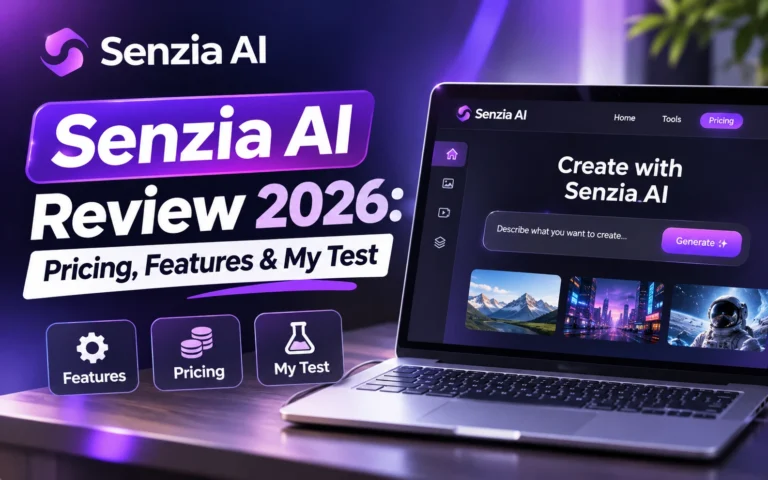
Senzia AI offers image generation, video creation, and editing tools in one browser-based platform. But how well does it work, and what can you actually create without purchasing a plan?
For this Senzia AI review, I tested its image generator, explored its video creation tools, checked its pricing, and examined its official policies. The image generator produced a realistic result that closely followed my instructions. However, I also discovered watermark restrictions and credit requirements worth considering before paying.
Quick Verdict: Is Senzia AI Worth It?
Senzia AI is worth exploring if you want to experiment with AI-generated images and videos in one workspace. During my test, its image generator created a detailed, realistic image that matched my prompt. The interface was straightforward, and Senzia displayed the credit cost before generation.
However, the image included a “Private Use Only” watermark. Removing it required an upgrade. The selected video settings also exceeded my remaining credit balance, so I couldn’t evaluate video output quality.
My recommendation: Try Senzia AI for image generation first. Before purchasing credits, review its watermark restrictions, generation costs, and commercial-use conditions.
What Is Senzia AI?
Senzia AI is an online creative platform that combines AI image generation, video creation, and editing features. Its dashboard includes Text to Image, Image to Image, Text to Video, and Image to Video. Users can enter prompts, upload reference images, select models, and adjust generation settings.
The platform also displays AI photo editing, video editing, and video extension tools. Senzia aims to simplify visual content creation by providing several workflows in one place.
It may interest bloggers, designers, marketers, and content creators who want to generate visuals without relying entirely on traditional editing software. However, my testing focused on image generation. I inspected the other features without evaluating every output.
How I Tested Senzia AI
I tested Senzia AI on October 29, 2026, using an account that initially displayed 20 credits. I generated an image from a detailed text prompt and examined its quality, composition, and download restrictions.
I also checked the available video generation settings, credit requirements, pricing plans, and purchase options. Finally, I reviewed Senzia’s official privacy and service policies.
I successfully generated one image. I did not purchase a paid plan or generate a video. This review distinguishes my hands-on results from features that Senzia advertises but that I haven’t independently tested.
Senzia AI Features Explained
AI Image Generator
The Senzia AI image generator provides two creation modes: text-to-image and image-to-image. Text-to-image generates visuals from written descriptions. Image to Image lets users upload existing pictures and provide instructions for a new result.
The image upload interface supported JPEG, JPG, PNG, and WEBP files up to 10 MB. I also found model selection, aspect ratio controls, and a prompt field supporting up to 4,000 characters.
Text-to-Video and Image-to-Video
The Senzia AI video generator offers separate workflows for creating videos from text and images. Text-to-video starts with a written prompt. Image-to-video uses an uploaded picture as its starting point.
Both interfaces displayed model selection, resolution, and duration settings. I inspected these options but couldn’t complete a video generation with my remaining credits.
Editing and Other Creative Tools
The dashboard also displayed AI Photo Editor, AI Video Editor, Video to Video, AI Video Extender, Create Movies, and AI Music. These tools broaden the platform’s potential uses beyond generating individual images. However, I did not test their editing quality or reliability.
My Hands-On Senzia AI Image Generation Test
The Prompt and Settings I Used
I selected the Pro V1.3 model, a 16:9 aspect ratio, and one image output. The interface displayed a cost of 10 credits.
I used the following prompt:
A photorealistic red fox sitting on a moss-covered rock in a misty pine forest at sunrise, soft golden light filtering through the trees, detailed natural fur, realistic shadows, cinematic photography, sharp focus, 16:9 composition, no text, no watermark.
The prompt included specific instructions about the subject, lighting, environment, and composition.
Image Quality and Prompt Accuracy
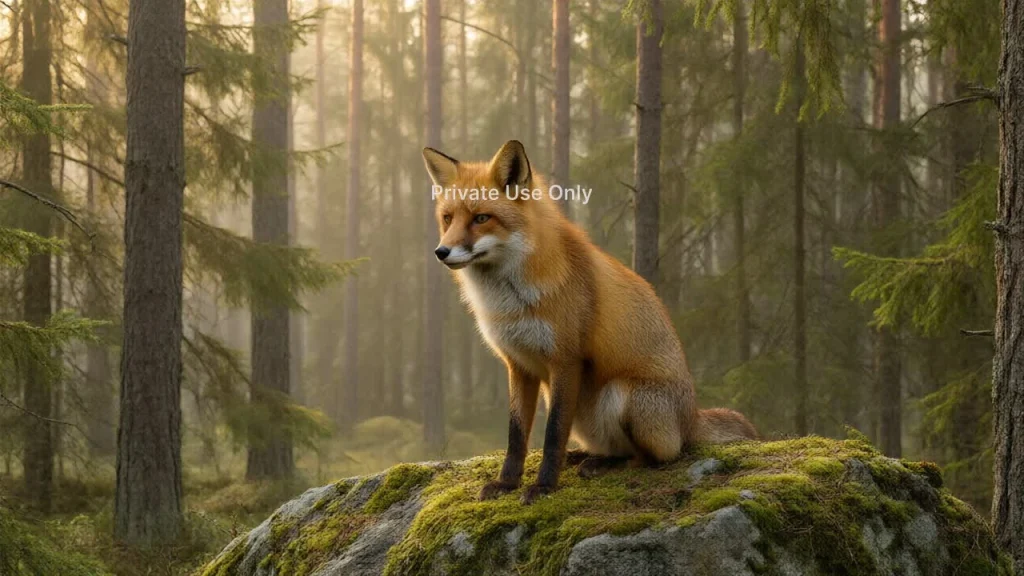
Senzia successfully generated the image. The result showed a realistic red fox sitting on a moss-covered rock, surrounded by trees and soft forest lighting.
The fox’s fur contained visible detail, while the background and lighting matched the atmosphere I requested. Overall, the image followed the prompt closely.
I didn’t observe major composition problems in this particular result. However, one successful generation cannot establish how consistently Senzia handles different subjects or more complex prompts.
The “Private Use Only” Watermark
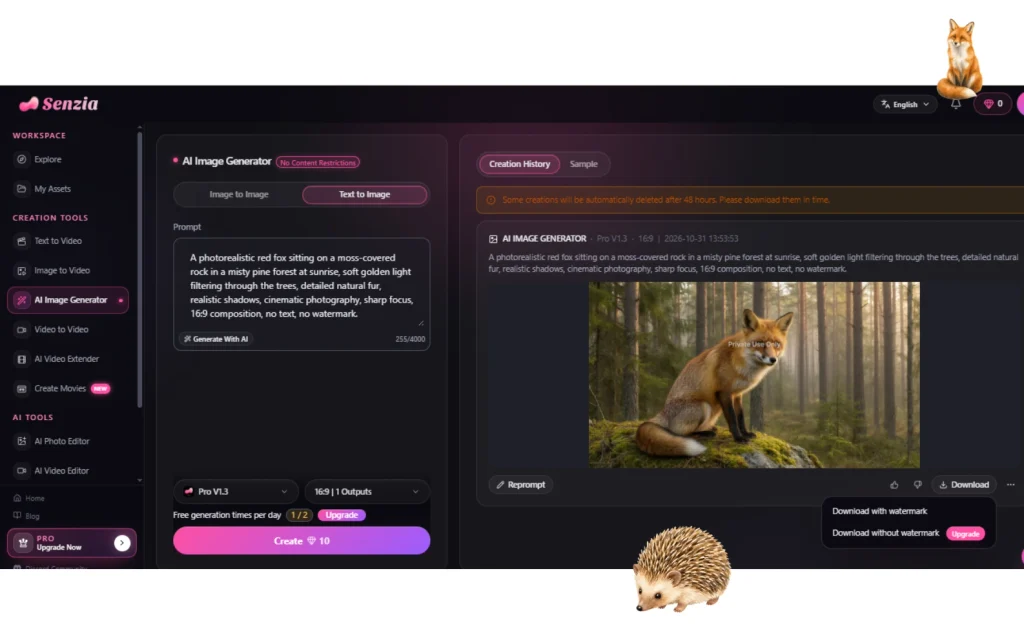
The most noticeable limitation appeared in the generated image. Despite my prompt requesting no watermark, the result displayed the words “Private Use Only.”
The download menu offered two options: Download with watermark and download without watermark—upgrade. Senzia therefore required an upgrade to access a watermark-free download.
My balance also dropped from 20 credits to 10 after generation. For users creating images for websites, marketing materials, or client projects, this restriction deserves attention.
Senzia AI Video Generation: What I Could Verify
I inspected both video generation interfaces to understand their requirements.
| Setting | Image to Video | Text to Video |
|---|---|---|
| Model | Pro V2.0 | Fast V1.0 |
| Resolution | 480P | 480P |
| Duration | 5 seconds | 5 seconds |
| Credit cost | 20 | 50 |
These costs applied to the selected configurations. Other models or settings may require different amounts.
Since my account had only 10 credits remaining, I did not generate a video. Therefore, I cannot independently assess motion consistency, video quality, generation speed, or download restrictions.
Senzia AI Pricing and Credits
Senzia AI pricing includes one-time payment plans and separate credit packages. The following prices appeared during my October 2026 testing and may change.
One-Time Payment Plans
| Plan | Price | Credits |
|---|---|---|
| Lite | $9.99 | 450 |
| Plus | $14.99 | 700 |
| Prime | $24.99 | 1,200 |
The pricing page displayed these amounts as part of a promotional offer. It also advertised watermark-free outputs, faster generation, private video visibility, and priority support. I did not purchase a plan, so I couldn’t verify those paid benefits.
Buy Credits Packages
| Credits | Price |
|---|---|
| 1,100 | $19.99 |
| 2,260 | $39.99 |
| 3,000 | $49.99 |
| 6,300 | $99.99 |
| 13,500 | $199.99 |
The Buy Credits page stated that purchased credit bundles remain valid for one year from the purchase date. Generation costs vary depending on the selected tool and model.
Is Senzia AI Free?
If you’re wondering if Senzia AI is free, my testing confirms that the account provided a limited starting credit balance. I initially received 20 credits and spent 10 generating one image.
The interface also displayed a daily free-generation counter, but my test still deducted credits. Free access therefore comes with limitations, especially for video generation and watermark-free downloads.
Watermarks, Commercial Use, and Privacy
Senzia AI commercial use requires careful consideration, particularly for business projects. My generated image contained a “Private Use Only” watermark. The download menu required an upgrade to remove it.
Senzia’s Terms of Service discuss rights in generated outputs, subject to applicable laws and platform conditions. However, those terms do not establish unrestricted commercial permission for every output.
The company’s Privacy Policy explains how it collects and processes account information, usage data, and submitted content.
The creation history also displayed a warning that some creations may be automatically deleted after 48 hours. Users should download important files promptly and verify licensing conditions before using generated content commercially.
Senzia AI Pros and Cons
| Pros | Cons |
|---|---|
| Straightforward image generation interface | Limited starting credits |
| Realistic result in my image test | Watermark on tested output |
| Multiple creative tools available | Video generation requires additional credits. |
| Adjustable generation settings | Video quality remains untested. |
| One-time payment options | Some creations may be deleted after 48 hours. |
Senzia’s terms also state that purchases are generally non-refundable, subject to applicable consumer-protection laws. Review the purchase conditions before paying.
Who Should Use Senzia AI?
Senzia AI may suit bloggers, designers, social media managers, and content creators who want to experiment with AI-generated visuals. Its image generator provides a straightforward way to turn written descriptions into images.
However, users who need regular commercial content should evaluate the credit costs, watermark rules, and licensing conditions first.
Best Senzia AI Alternatives
If Senzia AI doesn’t match your creative needs, these alternatives are worth considering.
| AI Tool | Best For | Key Features | Official Website |
|---|---|---|---|
| Adobe Firefly | AI image creation | Text-to-image generation and creative editing | Adobe Firefly |
| Runway | AI video creation | AI video generation and editing tools | Runway |
| Canva | Graphic design | Design templates, AI features, and visual editing | Canva |
These platforms serve different creative needs. Compare their current pricing, features, and usage restrictions before choosing one. For a closer look at graphic design tools, read our Piktochart vs Canva comparison.
Final Verdict
My Senzia AI review found a platform with useful creative features and a capable image generator. The image I generated closely matched my prompt, and the interface made the available settings easy to understand.
However, the “Private Use Only” watermark, credit requirements, and untested video quality remain important considerations.
Senzia AI is worth trying for image generation and creative experimentation. Before purchasing a paid package, check the output restrictions and make sure the available credits suit your needs.
Frequently Asked Questions
Does Senzia AI offer free credits?
My account initially displayed 20 credits. I used 10 credits for one image generation. Starting allowances may change.
How much does Senzia AI cost?
During testing, one-time payment plans started at $9.99 for 450 credits. Separate credit bundles started at $19.99 for 1,100 credits. Check the official website for current prices.
Can I download images without a watermark?
The free-account download menu required an upgrade for watermark-free downloading. I did not independently test a paid account.
Can I use Senzia AI images commercially?
Senzia’s terms discuss rights in generated outputs, but my test image included a “Private Use Only” watermark. Confirm the licensing conditions for your specific plan before commercial use.
Do Senzia AI credits expire?
The Buy Credits page advertised one-year validity for purchased credit bundles. I did not independently confirm whether unused credits can roll over or receive extensions.