If you’ve ever left a meeting wondering what was actually decided, you already know the problem Bluedot AI is trying to solve. I spent real time testing this bot-free meeting notetaker—not skimming its landing page—and here’s exactly what happened.
Quick Verdict: Bluedot AI is a solid pick if you want meeting notes without a visible bot crashing your call. Setup took minutes, and the free plan is genuinely usable for testing it yourself—though it’s a one-time trial, not a monthly reset. Starting price: Free (5 meetings, lifetime); paid plans from $18/user/month (or $14/month billed annually).
What Is Bluedot AI?
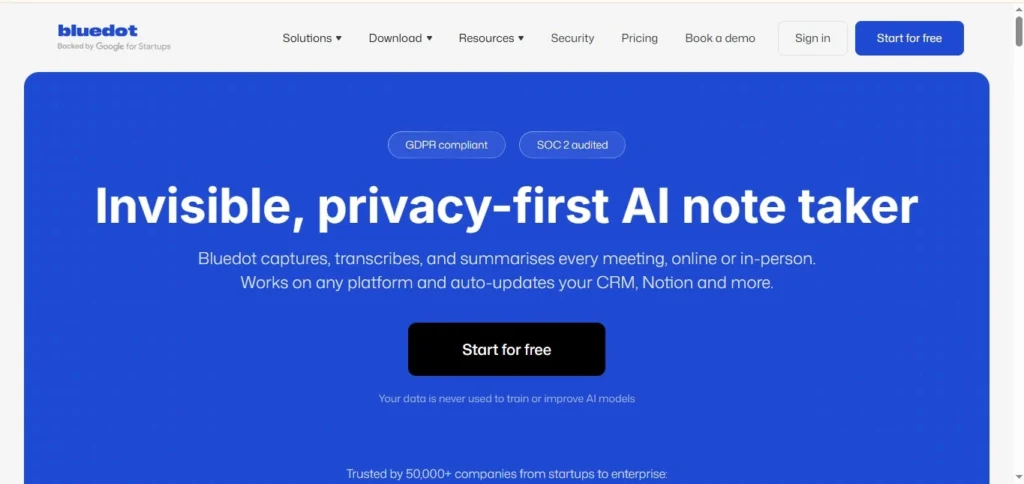
Bluedot AI is an AI note taker that records, transcribes, and summarizes meetings and conversations—without sending a visible bot into your call. without sending a visible bot into your call. For anyone who’s ever felt awkward about a random “Notetaker Bot” joining a client call, that’s the whole pitch.
It works with Google Meet, Zoom, and Microsoft Teams and also has a mobile app for recording in-person conversations.
How I Tested It
Signup was straightforward—I entered a workspace name, picked Google Meet as my main app, and installed the Chrome extension. No confusing settings, no tutorial video I had to sit through.
I clicked the extension before a real meeting and shared my screen, letting it run for 14 minutes. In my test, no bot participant joined the meeting—it recorded through the browser extension instead.
Bluedot AI Features: What Actually Stood Out
Bot-Free Recording ⭐
This is Bluedot’s core selling point, and in my test, it held up. No extra participant appeared in the call. No one had to click “Admit” for a bot. It just worked quietly in the background.
Transcript & Summary ⭐
After I ended the recording, Bluedot sent me straight to its dashboard. The transcript wasn’t instant—it took a short wait to generate—but once it was ready, it was easy to read. I also noticed an option to translate the transcript into other languages, which looks useful for international teams, though I didn’t put that specific feature through its own test.
AI Chat ⭐
This is where Bluedot AI meeting notes actually got useful. I used the same meeting transcript to test whether AI Chat could go beyond simply repeating the transcript. I asked it directly: “Summarize this meeting and list the key points and action items.” It correctly identified the key points and action items from my recording—not a generic restatement, but something that reflected what was actually said.
Bluedot AI Transcription: The Noise Test
Most reviews stop at “the transcription is accurate” without saying how they tested that. So I didn’t just record a quiet, one-person call. I tested it with multiple speakers and background noise in the room.
Result: the transcript remained clear in my test, including background noise and multiple speakers. I didn’t manually compare it word-for-word against the original audio, so I wouldn’t call this a precise accuracy measurement—but for a real, imperfect meeting room, it held up better than I expected.
Interface—Is Bluedot Easy to Use?
I didn’t need a manual. The dashboard is simple: recordings on one side, transcript and AI chat on the other. If you’ve used any note-taking app before, you’ll find your way around in a few minutes—which also answers a common question people have before trying a new tool like this: No, you don’t need to be technical to use Bluedot AI.
Bluedot AI Pricing (2026)
Here’s the breakdown, straight from the pricing page at the time of testing. Bluedot offers both monthly and annual billing—annual works out cheaper per month:
| Plan | Monthly Billing | Annual Billing | Best For | Key Features |
|---|---|---|---|---|
| Free | $0 | $0 | Trying it out | 5 meetings (lifetime, not monthly), 1-hour max per recording |
| Basic | $18/user/mo | $14/user/mo | Audio essentials | Unlimited audio meetings, unlimited storage |
| Pro (Most Popular) | $25/user/mo | $20/user/mo | No limits, with video | Unlimited video meetings, unlimited duration, custom templates, Zoom/Drive imports |
| Business | $39/user/mo | $32/user/mo | Teams at scale | CRM/ATS integrations, SSO, custom data retention |
| Flat Rate | Custom | Custom | Large companies | One fixed company-wide price |
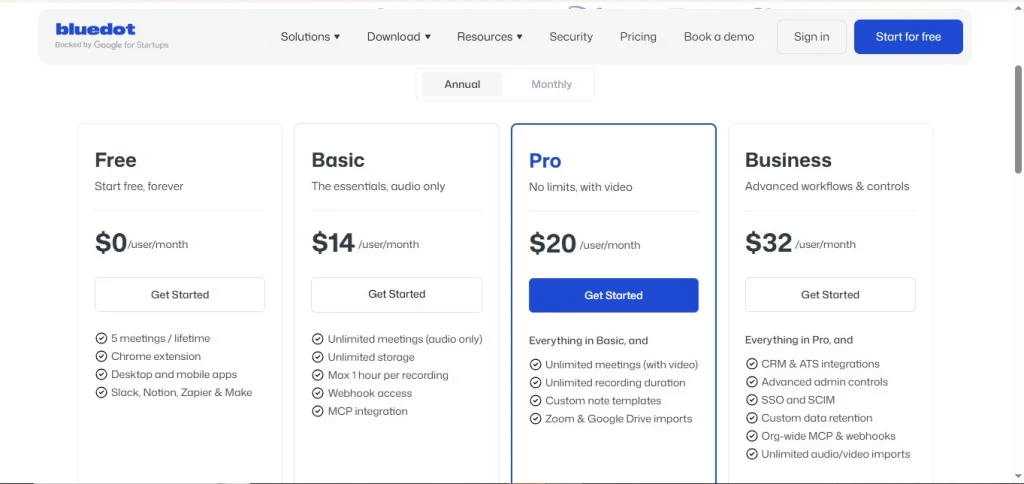
One thing worth flagging clearly: the Free plan isn’t 5 meetings a month — it’s 5 meetings for the lifetime of your account. So think of it as a limited free allowance for testing Bluedot, rather than an ongoing free recording plan.
Security & Privacy
Bluedot’s default sharing settings give you some control over who can access a recording. Recordings are private by default—visible only to you. If you want a team to see it, you have to deliberately move it into a shared collection.
You also control whether notes auto-share with all participants or only internal team members after a meeting ends.
Pros and Cons
| Pros | Cons |
|---|---|
| No visible bot joins your calls. | Transcript generation takes a short wait, not instant. |
| The transcript was held up under background noise and multiple speakers in my test. | The free plan is a one-time 5-meeting trial, not a monthly allowance. |
| AI chat gives accurate, specific answers. | I didn’t test every integration, so business-tier claims are based on the pricing page, not hands-on use. |
| Recordings are private by default. | — |
| Easy setup, no learning curve | — |
Who Bluedot AI Is Good For (And Who Should Skip It)
If you’re a freelancer, consultant, or small team that wants clean notes without an intrusive bot, Bluedot AI fits well. If you need enterprise-grade admin controls or heavy CRM automation from day one, you’ll want to look at the business tier—or compare it against a bot-based tool first.
Is Bluedot AI Worth It?
For the price of the free plan—nothing—it’s worth testing yourself before judging, even if that free trial only stretches to 5 meetings. In my test, it did what it claimed: no bot, a clear transcript even with noise, and a useful AI chat. If you’d rather see how a bot-based alternative compares, I’ve also tested Otter.ai in detail.
FAQ
Does Bluedot use a bot that joins my meetings?
No. In my test, no bot participant joined—it records through the browser extension instead.
Is Bluedot AI really free?
There’s a free plan, but it’s limited to 5 meetings for the lifetime of your account, not 5 per month.
Is Bluedot AI safe?
Meetings are private by default and only shared if you choose to move them into a shared collection.
How accurate is Bluedot AI transcription?
In my test, the transcript remained clear with background noise and multiple speakers. I didn’t calculate a word-for-word accuracy percentage, so I wouldn’t claim perfect accuracy—just that it held up well in a realistic setting.
Does Bluedot work with Zoom and Microsoft Teams?
Yes, alongside Google Meet, which is what I tested directly.
How does Bluedot compare to Otter.ai?
Bluedot main difference is the bot-free approach. For a side-by-side look, check my Otter.ai review.